Fishing charter booking software, from first inquiry to next trip
Keep your website, trip requests and follow-up in one place. Starter includes your site and guide app from $160/month. Prime adds online deposits and payments from $240/month, with no Charter Pro booking commission. Standard payment-processing fees apply.
See your site before you pay · 30-day free trial · Choose the booking flow that fits your trips
Leave your details and Casey will text you to arrange a quick chat about your charter. No payment today.
A real captain's website
See what a guest actually does
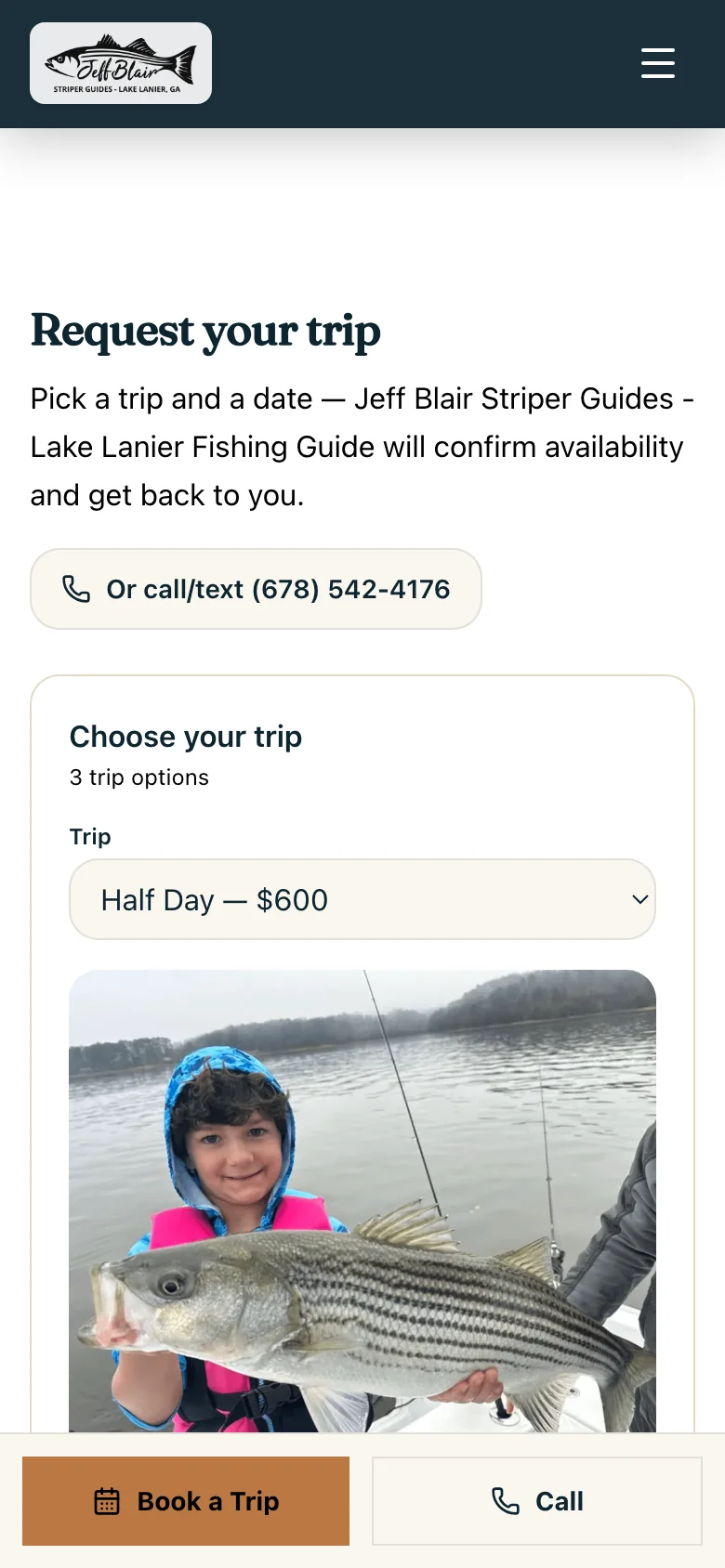
Jeff Blair Striper Guides uses a captain-confirmed request flow. Guests can review the trips and ask for a date; the captain confirms availability afterward.
- 01
Choose a trip
Review the actual trip, duration, price and group details.
- 02
Request a date
Pick a preferred day and provide contact details. The form explains that this does not book or charge anything.
- 03
Confirm with the captain
The operator reviews the inquiry and contacts the guest to agree the trip details.
This example shows booking requests. Prime and Pro add online payment capabilities after setup; this screenshot does not demonstrate a deposit checkout.
A fishing guide needs more than a reservation form
A guest needs to choose the right trip, understand the price and find a date. You need to check the weather, capacity and details before promising a day on the water. Your booking software should make those next steps clear for both of you.
Charter Pro connects the website that explains your trips with booking requests, the guide app, waivers, reviews and trip content. Start with captain-confirmed requests, and review the available booking and payment settings during setup. A request is an inquiry until availability is confirmed; it is not a paid reservation.
If you rely on a complex reservation desk, ask us to walk through your real operation before switching. Multi-resource allocation, manifests, reseller connections and existing marketplace calendars need their own compatibility review. Do not assume an integration from a feature name.
The work around each fishing trip
Choose your plan around the workflow you need. Website and app access start on Starter; online payments require Prime or Pro and payment-account setup.
Your trips on your own website
Describe duration, price, capacity, meeting arrangements and what guests should bring. Starter includes up to five trip and service pages.
Learn moreCaptain-confirmed requests
Guests choose a trip and requested date. You receive the inquiry and confirm availability before they treat it as booked.
Learn moreOnline deposits and payments
Prime and Pro add online payments after setup. Charter Pro charges no booking commission; payment-processor fees still apply.
Learn moreDigital fishing charter waivers
Save your operator-approved waiver text, email a signing link and check pending or signed records in your account.
Learn moreAn honest review request
Make requesting a genuine Google review part of your post-trip routine, without buying ratings or screening out unhappy guests.
Learn moreA reason to come back
Use trip photos, recaps and rebooking follow-up to keep a useful connection with previous guests.
Learn moreChoose around your guests and your operation
A booking tool and a source of new customers are different purchases. Compare the reservation workflow you need, the website and app work included, and how guests will discover your direct site. Ask for a demonstration with your actual trips before replacing a live system.
Walk through your first booking flow
Set up the trip
Review your trip descriptions, prices, party sizes, operating dates and policies. Choose which booking options should be active on your site.
Receive and confirm the inquiry
For the request workflow, the guest sends a preferred trip and date. Review the details and confirm availability with them.
Handle payment and preparation
On Prime or Pro, configure payments and your deposit terms. Send the waiver and practical arrival information before departure.
Close the loop after fishing
Record the trip, add appropriate photos, request an honest review and make the next booking easy to discuss.
Frequently asked questions
What does fishing charter booking software do?
It helps guests select a trip and date and helps the operator manage the resulting inquiry or reservation. Charter Pro also includes your website and guide app. Confirm the booking mode, payment features and any integrations you need before choosing a plan.
Is a date request a confirmed fishing reservation?
No. In the request workflow, the captain confirms availability after receiving the inquiry. The form tells guests that nothing is booked or paid yet. Review your site's active settings during setup.
How much does Charter Pro booking software cost?
Starter is $160/month for the website, app and booking requests. Prime starts at $240/month and adds online deposits and payments. All plans have a 30-day free trial and no Charter Pro booking commission. Standard payment-processing fees apply.
Can it replace FishingBooker or FareHarbor?
That depends on how your guests find you and which reservation tasks you need. A direct website does not replace marketplace demand by itself. Ask for a demonstration of your calendar, deposits, cancellations and any resource or distribution requirements before changing systems.
Is this also fishing guide reservation software?
Fishing guides can use the same website, trip-request and follow-up workflow for freshwater, fly and saltwater trips. Describe the waters and trips you actually offer, and check the workflow against your operation rather than choosing software by a label.
See your actual booking workflow
Start with your trips and your website. We will help you choose the right request and payment setup. Website and app from $160/month; online payments on Prime from $240/month.
Leave your details. Casey will text you to arrange a quick chat. No payment today.
- From $160/mo
- 30-day free trial
- No credit card to start
- Cancel anytime
- See your site before you pay